Best restaurant management software for US multi-location operators (2026)

A lot of operators are asking the same question: What's the best restaurant management software on the market right now?
The answer depends entirely on what you need from the system. A single-site diner in Ohio doesn't need what a 200-site chain across three states needs.
This guide isn't about picking a universal winner. Instead, we'll help you identify the type of platform that fits your operation. Then, we’ll break down the leading options, where they work well, and where they may not be the right fit.
What restaurant management software means in 2026
Restaurant management software is the system that connects the operational decisions behind every service, from staffing and inventory to food costs and profitability.
The definition of restaurant management software has stretched a little far in the last few years, with different types of systems claiming they run an entire hospitality operation:
- POS vendors call themselves restaurant management software because they handle the orders
- Scheduling tools claim the title because they build the schedule
- Accounting platforms claim it too. We mean something more specific
But real restaurant management systems cover all the things that run the operation once service is on. That means scheduling, time and attendance, inventory, supplier ordering, recipe and food cost, payroll, plus the reporting that ties them together.
What restaurant management software isn't: The POS itself, the accountant's monthly close, marketing tools, or guest-facing apps.
Those tools are useful, but they’re adjacent to an actual management system. They feed restaurant software with data, but they aren't restaurant management software.
In 2026, the restaurant management category is splitting in two directions:
- Toward operating systems. Single platforms that run multiple operational areas at once, increasingly with agentic AI doing the work autonomously rather than reporting on it.
- Toward specialists. Single-purpose tools (scheduling-only, inventory-only, BI-only) that go deep on one operational area and integrate to the rest.
The vendor you end up with depends on which direction makes sense for your restaurant. That's where the three questions come in.
How to choose the right restaurant management software: Three questions to ask yourself
Choosing the right restaurant management software starts with understanding your operation, not comparing feature lists. The best platform for one restaurant can become a bottleneck for a growing group, so asking the right questions upfront will save you time, money, and painful migrations later.
.webp)
Most buyer's guides jump straight into a giant feature comparison. That's useful once you've narrowed your options, but it's not where the decision begins.
Instead, start by answering these three questions. They'll quickly point you toward the type of platform that's the right fit for your business.
Question 1: Are you running one location or multiple sites?
Your number of locations is the biggest factor in choosing the top restaurant management software.
If you're running a single restaurant, a POS-led platform with a few built-in tools or add-ons is often all you need. Everything lives in one place, integrations stay simple, and your GM can usually oversee the entire operation without needing sophisticated reporting across locations.
In this scenario, the convenience of an all-in-one POS ecosystem is hard to beat. Things change surprisingly quickly once you open a second site.
Every decision suddenly needs to work across multiple locations. You're comparing labor costs between stores, forecasting demand for different trading patterns, managing more suppliers, and trying to build a consistent way of operating.
Most POS platforms aren't designed for this level of operational complexity. They've added multi-site capabilities over time, but they're still fundamentally built around individual locations.
The takeaway is simple: If you're running one location, a POS-led platform will often give you everything you need. Once you're operating two or more sites, it's worth stepping back and evaluating whether you need a true restaurant operating system instead.
Question 2: Should your software be POS-first or operations-first?
The platform you choose should match where your biggest operational challenges are. If running service is your priority, a POS-first platform often makes the most sense. If controlling labor, inventory, and profitability is where you spend most of your time, an operations-first platform will usually deliver more value.
POS-first platforms start with front-of-house operations. They handle payments, orders, tables, and customer transactions, then extend into scheduling, inventory, reporting, and other operational features.
Operations-first platforms take the opposite approach. They start with forecasting, scheduling, inventory, payroll, purchasing, and business intelligence, then connect to your POS rather than replacing it.
The best approach depends on where your operational challenges are:
- If your restaurant is relatively straightforward and your POS is the centre of your day-to-day operations, a POS-first platform often makes the most sense.
- If you're managing multiple locations and spending more time worrying about labor costs, food waste, inventory, and profitability than taking payments, an operations-first platform will usually deliver more value over time.
In short: Choose the platform that solves your biggest operational problem, not the one with the longest feature list.
Question 3: Do you need reports, or do you need decisions?
The most valuable restaurant software helps you decide what to do next. That's becoming one of the biggest differences between modern restaurant management platforms.
Traditionally, restaurant software focused on reporting. It showed your labor percentage, food costs, or sales performance, then left managers to figure out the next step. The software provided the insight, but people still had to analyse it and take action.
Newer AI restaurant operating systems are changing that model. Instead of simply highlighting a problem, they recommend or even automate the next action. Managers stay in control, but they're spending less time reacting to reports and more time overseeing the operation.
So ask yourself one final question: Do you simply want better reporting, or do you want software that helps make better decisions? The answer will tell you whether a traditional management platform is enough, or whether it's time to invest in an AI restaurant operating system.
The best restaurant operating systems for multi-site businesses
The best restaurant operating systems help you run every location more consistently and more profitably.
If you're managing multiple restaurants, bringing forecasting, labor, inventory, payroll, and reporting together in one platform makes it much easier to control prime costs and scale without adding complexity.
Here are three restaurant operating systems worth considering.
1. Nory
Nory is an agentic AI restaurant operating system that helps multi-site operators automate prime cost management to improve efficiency and profitability.
Rather than giving managers more reports to work through, Nory combines demand forecasting, scheduling, inventory, ordering, payroll, and compliance in a single platform. As a result, operators can make better decisions every day.
.webp)
Instead of treating AI as another chatbot or reporting assistant, Nory's AI Assistants work together across your operation:
- The Forecasting Assistant predicts demand in 15-minute intervals with up to 97% accuracy.
- The Scheduling Assistant automatically builds labor schedules that match that demand in seconds.
- The Ordering Assistant recommends or places supplier orders based on sales forecasts and inventory levels.
- The Payroll Assistant automates payroll workflows by managing pay runs, payroll cycles, and complex requirements across multiple locations.
- The Compliance Assistant stays on top of changing labor rules and operational requirements across different sites and jurisdictions.
Because every Assistant works from the same live operational data, decisions stay connected. Forecasts inform schedules, schedules influence labor costs, and inventory reflects expected demand. Everything rolls back to one goal: improving profitability across every location.
This connected approach is delivering measurable results. Customers typically reduce labor costs by 10-20% within their first eight weeks and cut food waste by around 50%.
Brands including Dave's Hot Chicken, Black Sheep Coffee, and Roasting Plant use Nory to automate day-to-day operations as they scale. Passyunk Avenue reduced labor costs by 26%, while Roasting Plant cut payroll processing from two days to around one hour alongside an 18% reduction in labor costs.
Nory is best suited to operators who want to replace disconnected systems with a single AI operating system. If your biggest challenge is improving profitability without increasing management overhead, it's one of the strongest options.
2. Restaurant365
Restaurant365 is an operations platform that brings accounting, inventory, reporting, and restaurant management together in one system. The software’s biggest strength is its accounting foundation, making it helpful for US multi-site restaurant groups that want tighter financial control across their business.
Restaurant365 offers deep accounting workflows alongside inventory, purchasing, labor, and reporting. If accurate financial reporting and back-office management are your priorities, Restaurant365 has earned its reputation.
However, it’s not ideal for operators specifically looking for autonomous decision-making. Restaurant365 surfaces data superbly, but the operator still drives the decisions.
3. Toast (fully bundled)
Toast is a POS platform that has expanded into a broader restaurant management system. It's useful for restaurants that already rely on Toast to run front-of-house operations and want more of their technology under one roof.
Because scheduling, payroll, online ordering, inventory, and payments all sit within the same ecosystem, Toast reduces the need for additional vendors and integrations. This means that operators already using Toast will have a pretty streamlined experience (particularly if their priority is keeping front-of-house and back-office tools closely connected).
But on the flip side, for multi-site groups who don’t already use Toast, it might not be the best option.Switching means replacing your existing POS alongside the rest of your restaurant tech stack, which can make migration more disruptive and expensive.
The best POS-led systems for restaurant operators
The best POS-led restaurant management systems keep day-to-day operations simple, letting you handle customer payments and bookings with ease.
Here are three of the strongest POS-led options.
1. Toast (POS-led)
The POS-focused version of Toast handles core front-of-house operations, from payments and order management to table service and customer interactions.
Scheduling, payroll, online ordering, loyalty, inventory, and reporting all connect natively to the POS, making it easy for single-site restaurants and smaller chains to manage operations without juggling multiple vendors.
It's particularly useful for full-service and casual dining restaurants, and its US-native tax and payment capabilities are a nice benefit.
However, as your business grows, you may start to outgrow the platform. Multi-site operators that need deeper labor optimization, cross-site reporting, or advanced operational workflows often end up adding specialist tools alongside Toast.
2. Square
Square is an easy-to-use POS platform built for smaller restaurant businesses. It's particularly popular with quick-service restaurants, cafés, food trucks, and counter-service concepts that want to get up and running quickly.
Square's fast implementation is appealing to a lot of operators, with most users getting live within days. The platform also includes the core tools needed to run a single location without a lengthy setup process.
But if your operations expand, there can be some limitations with Square. Restaurants with complex scheduling, custom pay structures, or more sophisticated multi-location operations will likely need additional software to support their growth.
3. Lightspeed
Lightspeed is a restaurant POS platform with a focus on inventory and menu management. It's a common choice for independent restaurants that want greater control over inventory, recipe costing, and purchasing without leaving their POS.
Its inventory tools are where Lightspeed offers the most value. For this reason, it can be helpful for bars, fine dining restaurants, and food retail businesses where tight inventory control has a direct impact on profitability.
For larger, multi-location restaurant groups, though, Lightspeed is less of a complete operating platform. Operators looking to manage labor, payroll, business intelligence, and inventory in one system will typically need to add other specialized tools alongside it.
The best systems for restaurant labor management
The best labor management systems help restaurants control one of their biggest costs: labor. If your biggest challenge is building schedules, managing shift changes, tracking attendance, or keeping labor costs under control, a specialist labor platform can give your team the tools they need without adding unnecessary complexity.
The trade-off is that these systems focus deeply on one area of restaurant operations. They can help optimize scheduling and workforce management, but they typically won't replace a full restaurant operating system for areas like food cost, forecasting, or overall profitability management.
Here are three of the strongest labor management options.
1. 7shifts
7shifts is a restaurant-focused labor management platform for scheduling, team communication, and labor cost tracking. It helps operators create schedules, manage shift changes, communicate with teams, and monitor labor performance.
The platform is designed specifically for restaurant workflows, with features that support scheduling complexity, US tip credit requirements, and predictive scheduling laws. For operators primarily looking to improve how they build and manage schedules, 7shifts offers a broad selection of tools.
However, its focus is labor management rather than wider restaurant operations. Multi-location operators looking to connect scheduling decisions with food costs, demand forecasting, or profitability data will typically need additional systems.
2. When I Work
When I Work is an employee scheduling platform that helps businesses manage shifts, availability, and team communication. The software is used across several industries, but it’s also used by hospitality operators that need a straightforward way to organize their workforce.
The platform is built around simplicity, with quick setup and an easy experience for both managers and employees. For this reason, it’s a practical option for operators looking for basic scheduling functionality without a complex implementation process.
For restaurants with more specialized workforce requirements (such as deeper POS integrations, tip pooling, or restaurant-specific pay structures), you may need additional tools.
3. Homebase
Homebase is a workforce management platform for small businesses that need affordable scheduling and employee management tools. It’s commonly used by single-location restaurants, coffee shops, and other small hospitality businesses.
The platform provides core workforce tools like scheduling, time tracking, and team communication. It also has a free tier available for businesses that need a simple solution at a lower cost.
But as operations become more complex,Homebase may not meet the needs of larger restaurant groups. Businesses managing multiple locations, advanced compliance requirements, or more sophisticated labor optimization strategies may need a more specialized platform.
The best restaurant inventory management systems
The right inventory management system will reduce waste and control food costs.
Just bear in mind that these tools aren't designed to run your entire operation. Most focus exclusively on inventory, purchasing, and recipe management, leaving labor, forecasting, and wider operational planning to other systems.
Here are three of the solutions you can consider:
1. MarketMan
MarketMan is an inventory and purchasing platform for managing stock, suppliers, and food costs. It brings ordering, inventory tracking, and supplier management together, giving operators better visibility into what's being purchased and how costs change over time.
A lot of its functionality is built around purchasing and supplier management, with native US supplier integrations that cut down on manual ordering and admin. Restaurants often use it to bring more consistency to purchasing and get a better handle on food cost variance.
If you're looking for software that also manages labor, forecasting, and wider business performance, you'll likely need another platform alongside it.
2. MarginEdge
MarginEdge is a food cost platform that turns supplier invoices into near real-time cost data. Using OCR technology, it automatically captures information from invoices, so operators spend less time entering data manually and more time understanding where costs are changing.
MarginEdge focuses on making food costs easier to track day to day. That makes it useful for restaurants that want quicker visibility into ingredient costs without relying on spreadsheets or manual reporting.
It doesn't cover areas like labor management or forecasting, so restaurants looking for a more complete operational platform will usually pair it with other software.
3. Apicbase
Apicbase is an inventory and recipe management platform for restaurants with more complex food operations. It helps teams manage recipes, ingredients, purchasing, and menu profitability from one place.
The platform is commonly used by operators that need tighter control over recipe consistency across multiple concepts or central production kitchens. It also gives operators more visibility into how individual menu items affect overall food costs.
For restaurants that want to manage labor, forecasting, payroll, and business intelligence in the same system, Apicbase will typically need to sit alongside other tools.
The best restaurant business intelligence (BI) systems
A restaurant BI platform should help you understand what’s happening across your business. These tools bring data from your POS, scheduling, inventory, reservations, and other platforms into a single dashboard, helping you spot trends and make more informed decisions.
The important thing to remember is that BI platforms show you what’s happening, but not necessarily how to change it. Because they rely on data pulled from other systems, the quality and freshness of the insights will always depend on the systems feeding into them.
Here are three restaurant BI platforms worth considering.
1. Nory
Nory’s real-time business intelligence gives operators a live view of performance across every location.
Instead of pulling reports and figures from multiple systems, the system centralizes labor, sales, inventory, payroll, and forecasting into a single dashboard. This means operators can easily monitor KPIs and identify issues as they happen, making quick changes to boost profits.
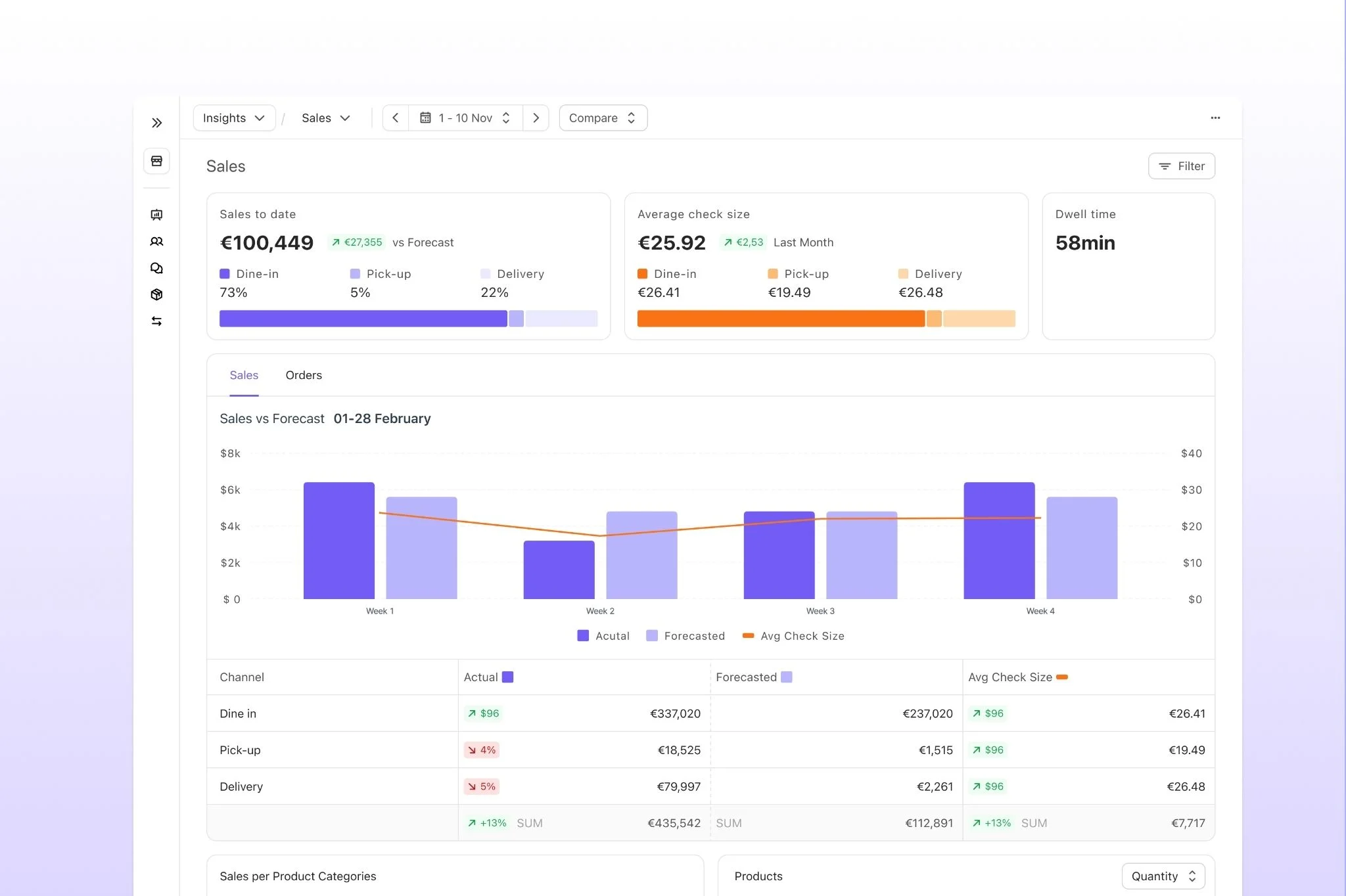
Unlike traditional restaurant BI platforms, Nory doesn't stop at reporting. The business intelligence directly feeds into the AI Assistants, which recommend improvements and automate operational decisions. Operators can act on insights immediately rather than interpreting dashboards and making changes manually.
For multi-site restaurant groups, this means faster decisions, fewer disconnected reports, and a clearer picture of what's driving profitability across the business.
2. Tenzo
Tenzo is a restaurant analytics platform that brings data from different systems into a single view of business performance. It helps multi-site operators track KPIs, compare locations, and understand trends across their operations.
A key part of Tenzo’s offering is its ability to connect with a wide range of restaurant systems, including POS, scheduling, inventory, reservations, and other operational tools. With 70+ integrations, it gives you a way to combine data without manually pulling reports from each platform.
Because Tenzo sits on top of your existing tech stack, the insights it provides depend on the data coming from those systems. Operators looking for software that can take action on insights, rather than just surface them, will typically need additional operational tools.
3. Black Box Intelligence
Black Box Intelligence is a restaurant analytics platform that combines internal performance data with industry benchmarking insights. It’s typically used by larger restaurant groups that want to compare their results against wider industry trends.
Black Box Intelligence has a strong focus on external benchmarks. It provides insights into areas like sales trends, labor benchmarks, traffic patterns, and how performance compares across the restaurant industry.
But for operators primarily looking for internal dashboards to manage day-to-day operations, rather than broader industry comparisons, a more operationally focused BI tool may be a better fit.
Choosing an operating system with US-specific compliance in mind
The US restaurant compliance landscape has specific requirements that shape platform selection. If your platform doesn't handle these natively, you'll be adding manual work or additional tools:
- FLSA overtime rules. Federal minimum wage, overtime at 1.5x standard rate above 40 hours. Some states (California, Alaska) have daily overtime rules on top.
- Tip credit vs tip pooling. Federal tip credit lets employers pay tipped workers below minimum wage if tips make up the difference. State variations are significant. Some states (California, Oregon, Minnesota, Nevada) don't allow tip credit at all.
- Predictive scheduling laws. The “Fair Workweek” ordinances in NYC, San Francisco, Seattle, Chicago, Emeryville CA, and Oregon require advance schedule notice (typically 14 days), premium pay for last-minute changes, and predictable-pay provisions. Non-compliance carries per-worker penalties.
- State-by-state tax variations. Payroll tax structures, unemployment insurance rates, workers' comp requirements all vary. National operators need platforms that handle multi-state payroll natively.
- Biweekly vs monthly payroll cycles. Biweekly is the US default and monthly is uncommon. Platforms designed for European monthly cycles (or requiring configuration to run biweekly) create friction.
Side note: Nory's Payroll Assistant handles US payroll cycles including biweekly, multi-state tax, tip credit, and predictive-scheduling premium pay natively.
Restaurant management platform comparison: How to actually choose the right restaurant management system
The right restaurant management system depends less on the number of features you need and more on the type of business you’re trying to run.
Before comparing vendors, answer three questions: how complex is your operation, where does your software need to sit, and do you need insights or action?
Start here:
- Are you running a single location or multiple locations? A second location changes everything. What works when one GM can see the whole operation starts to break when decisions need to be consistent across multiple teams and sites.
- Do you want your software built around the POS or around operations? POS-first platforms work well when transactions are the centre of your business. Operations-first platforms are designed for operators who need deeper control over labor, inventory, forecasting, and profitability.
- Do you need reporting or decision-making? Traditional platforms help you understand what happened. Newer AI-powered systems can help decide what happens next by turning insights into actions.
Once you've answered those questions, you can narrow down the right category:
If you came out anywhere else, the answer is usually to start with the specialist that matches your biggest pain. Then, you can re-open the operating-system question the moment you have a second site.
Where to start the shortlist if profitability is the goal
If the question you're really trying to answer is, “What gets my US restaurants to the highest profitability fastest?”, the operating-system path wins.
Profitability is a function of labor and food cost moving together against forecast demand. Tools that optimize labor but not food cost cap at single-digit improvements, and tools that optimize food cost but not labor do the same.
Operating systems are the only category that handle both in one data layer. And from the moment you have two sites, you need that data layer working across both of them.
Within that path, Nory is the only agentic option.
.webp)
The system runs the work autonomously rather than simply reporting on it, meaning you can move from identifying problems to automatically taking action. From forecasting demand and building schedules to optimizing orders and managing operational tasks, Nory is built to continuously improve restaurant profitability.
Side note: We're not the right call for single-site operators with a clean operational picture and one specific tool gap. The specialists or POS-led suites cover these use cases better.
FAQs about the best restaurant software in 2026
What is the best restaurant management software for multi-location restaurants?
The best software depends on whether your priority is profitability, reporting, or POS consolidation.
For operators focused on improving profitability through AI-driven decisions, Nory is built for this approach. Restaurant365 is a strong option for groups prioritizing accounting and reporting, while Toast makes sense for operators already invested in its POS ecosystem.
What's the difference between restaurant management software vs a POS system?
A POS manages orders, payments, and table service. Restaurant management software typically covers areas like scheduling, inventory, payroll, forecasting, and business intelligence.
Do I need a separate scheduling tool if I'm using restaurant management software?
Not always. It depends on what your platform already includes!
Many restaurant management systems include scheduling as part of a wider operating platform, while specialist tools like 7shifts or When I Work focus specifically on workforce management.
A dedicated scheduling tool makes most sense when scheduling is your biggest challenge or when your existing software lacks the functionality you need.
What are the predictive scheduling laws that affect restaurant software choice in the US?
Predictive scheduling laws require restaurants in certain US cities and states to provide more predictable schedules for employees.
For example, regulations in places like NYC, San Francisco, Seattle, Chicago, Oregon, and Emeryville include requirements around advance notice, last-minute changes, and premium pay.
Software with predictive scheduling features can help automate compliance instead of relying on manual tracking.
How is agentic AI restaurant management different from traditional software?
Traditional software shows you what happened, but agentic AI helps decide what happens next.
Instead of only reporting on labor costs or food costs, agentic systems can forecast demand, build schedules, optimize ordering, and automate operational tasks. The goal is to move managers from manually doing the work to reviewing and guiding decisions.
What's the fastest way to reduce labor cost at a US multi-site restaurant group?
The fastest way to reduce labor costs is usually through demand-based scheduling.
By matching staffing levels to expected demand, operators can reduce overstaffing during slower periods while protecting service during busy times. AI scheduling systems can automate this process by building schedules around sales forecasts, labor targets, and site-level needs.
What is the best restaurant management software for chains?
Restaurant chains typically benefit most from software that can standardize operations across every location.
As your business grows, managing labor, inventory, forecasting, and reporting in separate systems becomes more complex. Restaurant operating systems bring those areas together, giving you a consistent way to manage performance, control prime costs, and scale more efficiently across multiple restaurants.
What’s the best restaurant operating system for franchises?
The best restaurant software for franchises gives:
- Franchisees the flexibility to run their site
- Franchisors the ability to track performance and maintain consistency across the entire network
Look for a platform that connects forecasting, labor, inventory, payroll, and reporting in one place, while offering visibility into performance across every site.
Choosing the right all-in-one restaurant management software for your next stage of growth
The right restaurant management system depends on where your business is today and where you're trying to go. Whether you need better reporting, deeper control over costs, or software that runs operations automatically, the key is choosing a platform that matches your needs and goals.
For multi-site operators looking to connect forecasting, labor, inventory, and profitability in one place, Nory brings everything together. Our agentic AI operating system helps operators make faster, smarter decisions based on real-time data across locations.
Ready to see what that looks like for your restaurants? Book a chat with the Nory team today.
Disclosure and methodology
This guide is published by Nory, an agentic operating system for multi-site restaurants who want AI Assistants running their operations against a prime-cost target.
We used a buyer-decision framework (three questions: single-site vs multi-site, POS-first vs operations-first, reporting vs decision-making), grouped vendors by the cell of the framework they fit best, and described each vendor honestly within its category. Where Nory is the clear answer (US multi-site operators with profitability as the primary goal), we said so. Where Nory isn't (single-site operators with one specific operational gap), we said that too.